
Creative analysis
See what each ad image and text shows, with editable tags, ratings and scores compared only within the same campaign.
What it does
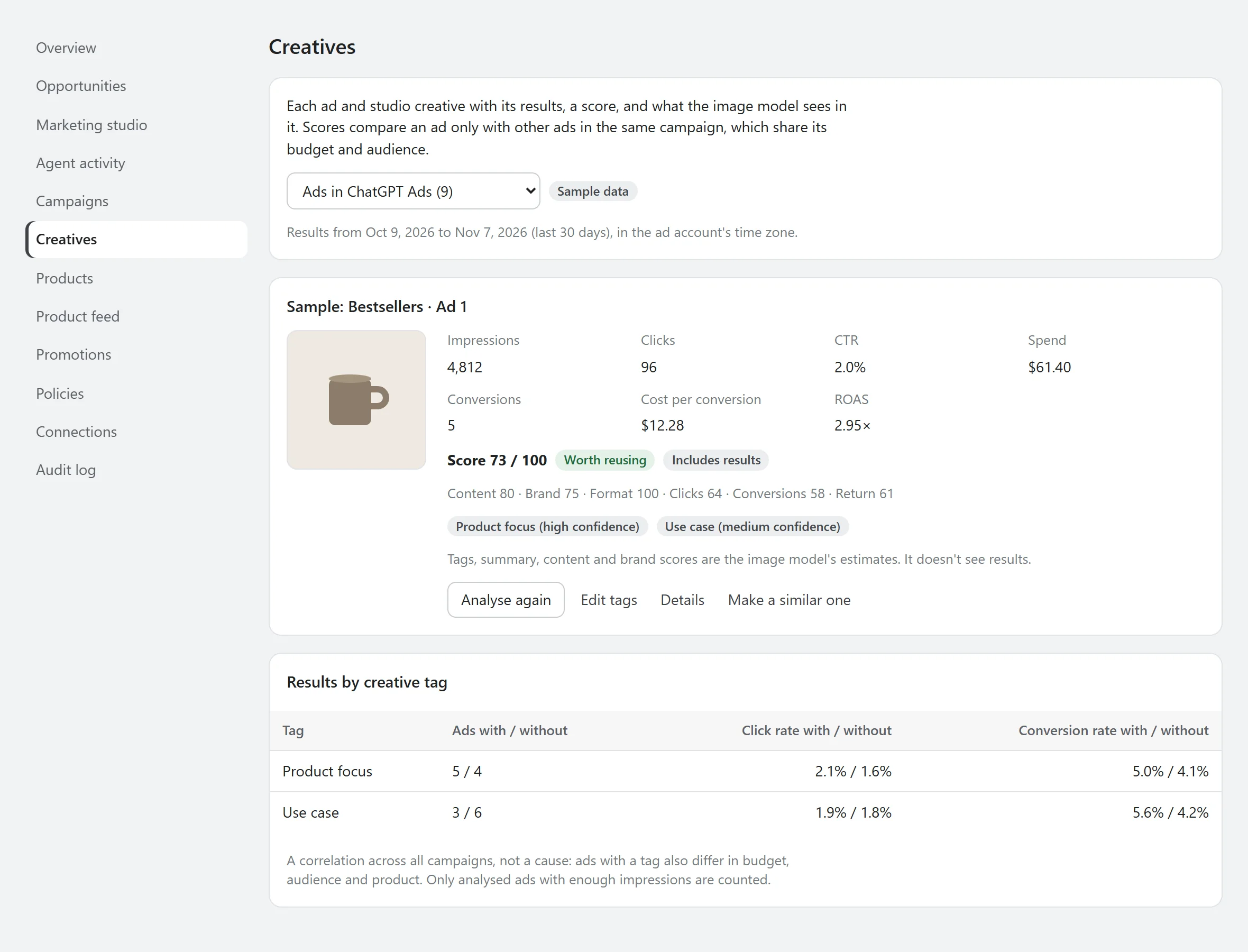
The Creatives page lists your ChatGPT ads and studio creatives. An image model describes each one, tags it, rates its clarity and brand fit, and suggests what to improve. Scores then compare clicks, conversions and return with the other ads in the same campaign.
Why it matters
When one ad does better than another, you want to know what's different about it. Tags and side-by-side scores make that visible, so the next creative can be better on purpose.
How it works
- The analysis sees the image and the copy, not the results, so the description isn't shaped by them.
- Each ad gets up to five tags with a confidence. You can replace them, and your tags are used from then on.
- Performance scores compare an ad only with ads in the same campaign, and only after minimum impressions, clicks and conversions. Below that, it says there isn't enough data.
- Results by tag compare ads with and without a tag across your account.
Where it stops
- Results by tag are a correlation, not a cause. Ads with a tag also differ in budget, audience and product.
- Each analysis counts as one AI draft.
- Tested with sample data. Reading ads from a live account hasn't been tested yet.
See what it would do before it does anything.
AgenAds isn't on the Shopify App Store yet. The demo runs the app's real discount, policy and copy checks, so you can test the logic today.